AI Content Review Before Publishing: Check the Hidden Fields
Key takeaways
- AI content review before publishing now means a human checks the title, meta description, structured data and alt text, not just the body copy, because Google calls manual fact-checking of all AI-generated content critical.
- Those hidden fields are where an invented credential or a wrong address can sit for months.
AI content review before publishing now means a human checks the title, meta description, structured data and alt text, not just the body copy, because Google calls manual fact-checking of all AI-generated content critical. Those hidden fields are where an invented credential or a wrong address can sit for months. Each one takes a few minutes to check by hand, and a good review process also refuses drafts that say nothing only your practice could say.
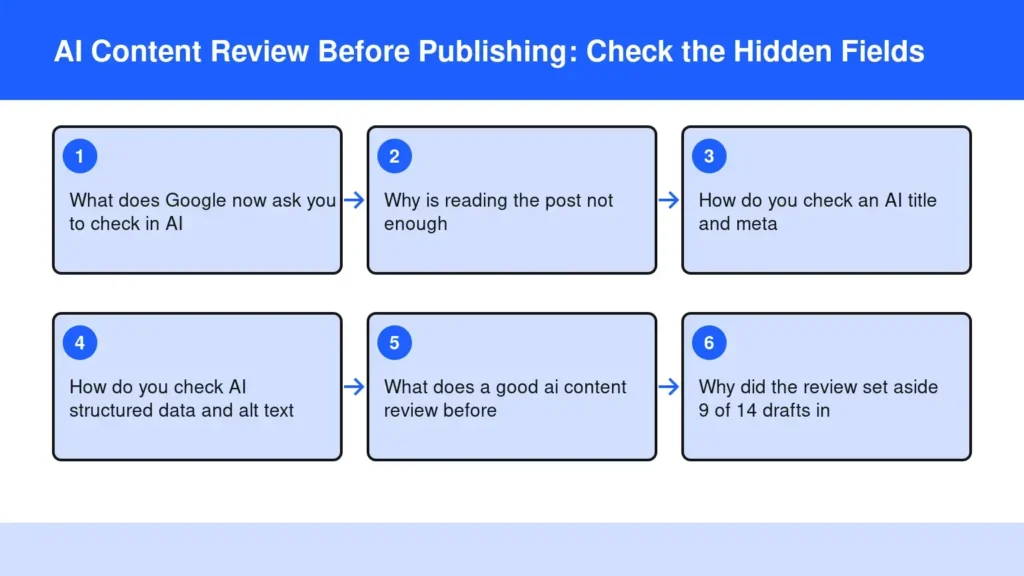
What does Google now ask you to check in AI content?
Google asks you to fact-check every piece of AI-generated content by hand before you publish it, and that includes the parts readers never see on the page. That is the heart of any ai content review before publishing: the body copy is only one of five places a mistake can live. Search Engine Journal reports that Google’s guidance now says manually fact-checking all AI-generated content before publishing is critical, with a warning about hallucinations.
The rewrite names the hidden fields directly. HigherVisibility notes that the obligation now extends to title tags, meta descriptions, structured data, and alt text, which it calls the surfaces most businesses auto-generate at scale. Relevant Audience reads the change the same way, covering titles, meta descriptions, schema and alt text.
So the four fields to check are:
- The title, which becomes the blue link in search.
- The meta description, the short summary under that link.
- Structured data, the code that tells Google your name, address, hours and services.
- Alt text, the written description behind every image.
Why is reading the post not enough?
Reading the post is not enough because the hidden fields never appear in the article, so a normal proofread walks right past them. An office manager can read a draft twice, approve it, and still publish a meta description that names a service the practice dropped.
The generation step makes this worse. Most AI writing tools fill these fields automatically, after the article is done, with less context than the body had. A model that lacks your real suite number will often supply a plausible one rather than leave the field blank. A model asked to describe a photo of your treatment room may add a credential nobody on staff holds.
Those errors travel. A wrong title or description is what a patient sees in search before they ever reach your site, and structured data feeds the answers other machines give about you. I wrote about checking one page for accuracy in Helpful Content Accuracy Health; the hidden fields are the part of that page most teams skip.
How do you check an AI title and meta description?
Check each one against the article and against your own facts, and give each about five minutes. You are asking two questions: does it match what the page actually says, and is every claim in it true of your practice?
The title
Google’s own starter guide says a good title is unique to the page, clear and concise, and accurately describes the contents. Open the post, read the title, then read the first paragraph. If the title promises something the post never delivers, rewrite it. Next, search your own site for the same title; two posts with near-identical titles compete with each other. Last, check any name, town or credential in it against your staff list.
The meta description
Read it out loud as if a patient were reading it in search results. Circle every specific: a service, a price, a town, a qualification, a promise. Each one needs to be true today and stated somewhere on the page. Delete anything that sounds like marketing language you would never say at the front desk. If it reads like a different practice, start again in your own voice.
How do you check AI structured data and alt text?
Compare structured data line by line with your Google Business Profile and your contact page, and read each alt text while looking at the image it describes. These two take the most care because you cannot see them without looking at the code or your editor’s image settings.
Structured data
Google’s guidelines say don’t use structured data to deceive or mislead users, and they warn that a structured data issue can result in a manual action. In practice, the risk is rarely deceit; it is an invented detail. Check the business name, street address, suite, phone, hours and the list of services against the real ones. Then check the author and reviewer fields. A schema block that names a doctor who did not write the post, or a degree they do not hold, is the exact error that stays hidden longest.
Alt text
Hobo’s guide cites Google’s documentation that keyword stuffing in alt attributes results in a negative user experience and may cause your site to be seen as spam. Open each image, read its alt text, and ask whether it describes what is actually in the picture. Remove any claim the image cannot show, like a certification or a result. Keep it plain: what a person on the phone would need to picture it.
What does a good ai content review before publishing look like?
The check is not whether the draft reads well. It is whether it carries first-hand facts no other practice could have written.
I run a multi-location wellness practice and my own film and book sites, and I hold every draft to the same rule I would want from a human writer. A post that could run on any clinic’s site with the name swapped is the kind of thin, interchangeable work Google’s scaled content abuse policy is aimed at. A real review should stop it rather than polish it.
The pass sits inside the workflow, not after it. The writing, the hidden fields and the sources all reach review together, so the title, description and image text get the same scrutiny as the article. That matters for the same reason your byline needs real work behind it: the name on a post is a promise about who knows the subject.
Why did the review set aside 9 of 14 drafts in one week?
On one of my sites, the review set aside 9 of 14 drafts in a single week because the site’s facts held too little that only that business could say. The drafts were not broken. They simply had nothing first-hand in them, so they did not go out.
That week taught me something every practice owner should hear before buying any content tool: the quality of the facts you give it decides what can be published. A practice that has recorded its own methods, its locations, its staff qualifications and the questions patients actually ask at the desk gives a review something to check against. A practice that has written none of that down gets fewer posts, and that is the right outcome.
I would rather publish five posts that sound like the business than fourteen that sound like everyone. Losing those drafts cost nothing; publishing them would have handed readers the same generic answers they could find anywhere, under a brand that deserves better.
Frequently asked questions
Can AI-generated content be published without human review?
It can be published, but Google’s guidance now calls manual fact-checking critical, so skipping it is a choice to accept unchecked errors. For a practice, those errors can mean a wrong address, a service you no longer offer or a credential nobody holds. A human pass, or a review that refuses drafts without first-hand facts, is the safer standard.
What is the biggest risk with unreviewed AI content?
The biggest risk is a confident, specific falsehood about your own practice, published where you will not notice it. Invented details in schema or a meta description can be repeated by search results and AI answers long after the page goes live. Patients trust those summaries, so a single wrong detail can cost a booking or create a compliance question.
How long does it take to set up an AI content review workflow?
A basic workflow can start with your next post. Write down your true facts once: name, addresses, suites, hours, services, staff and credentials. Then check every draft and its hidden fields against that one document. The setup work is the fact sheet; after that, each review is short because you are comparing, not researching.
Do staff need to learn new tools to review AI content?
Not usually. Most reviewing happens in the editor your site already uses, plus a free structured data testing tool from Google for the schema. The skill that matters is knowing the practice’s facts, which office managers already have. What changes is the habit of opening the image and SEO settings before pressing publish.
How do you review AI content written in more than one language?
Have someone fluent in each language check the translated title, description and alt text, not only the article. Translation can change a credential’s meaning or drop a qualifier that made a claim accurate. Keep one fact sheet as the source of truth so every language version is checked against the same names, addresses and services.
The Bottom Line
Check the four hidden fields on every post: title, meta description, structured data and alt text. Compare each against your own written facts, and refuse any draft that could belong to a different practice. If that sounds like hours you do not have, the fix is a process that does the checking and sets aside the drafts that fail, rather than one that publishes everything it generates.
Try it.
Start free for 14 days
Sources
- Google Tells Sites To Fact-Check AI Content Before Publishing – Search Engine Journal
- Google's AI Content Guide Now Calls Manual Fact-Checking Critical – HigherVisibility
- Google: Fact-Check All AI Content, Including Metadata – Relevant Audience
- General structured data guidelines – Google Search Central
- SEO Starter Guide: The Basics – Google Search Central
- The Definitive Guide to Image Alt Text Best Practices – Hobo